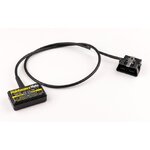
Update. Just used the Maintenance Mate. Verdict in one word. Great.
Only read on if you are interested in buying one. If not this waffle will be a waste of your time. It ended up being a 5 min job, or at least it will be next time I do it. I pre-read the instructions carefully twice before attempting the service icon reset. This is a sort of how to, I considered photos but tbh it’s so simple a job I don’t think it needs it.
Turn the ignition on, bike must be in neutral and in run position but do not start it, then using the menu buttons on the LHS handlebar toggle through the menus to set values to METRIC. I live in the UK so my bike is normally on IMPERIAL units mph, gallons etc. Not sure why you have to do this but it says you must. So I did. If you live in Europe or Canada you can skip this and just dive in.
Next. Leaving the bike ignition still on plug the Maintenance Mate into your OBD socket (under RHS side panel). Easy. The unit then comes to life and should register a number, mine read 10. The instructions explain what the numbers mean and in my case the 10 meant 10,000km between service intervals. I expect unless it’s due it’s first service your bike should be the same really. Anyhow you can reduce that service interval but I don’t see why you would so just left it as it was on 10.
Next. Then by pressing buttons simultaneously on the gadget you go to the next variable, the DATE next service is due. It’s described in the instructions as D1, D2 and D3. They correspond to year, month and day. You only really need to change D1 to knock the year forward a year, which I did by pressing the button. That’s it, press save, the unit displays ‘UP’ which means it’s been uploaded, then switch ignition off. Unplug Maintenance Mate.
It says wait at least 5 seconds before turning ignition back on to check all is well. If not repeat and try again. Mine worked first time. The spanner icon was gone, next service date changed. I then changed my settings back from METRIC to IMPERIAL (mph, gallons etc). Done

.
Next time it will be an absolute breeze. Like all of these procedures after you’ve done it once it all makes so much more sense. Ultimately all I had to do was change one value D1 from 24 to 25 (i.e 2024 to 2025).
There is no other functionality or diagnostic ability with this gadget. It allows you to change service interval and service date, that’s it. If that’s all you want, from my experience I would highly recommend it to you.