• Welcome to the BMW R18 Forums. Member registration disables ads and allows you to post and share. Register Here.

Maintenance Mate tool (UK owners probably)

  • <i class="fa--xf fal fa-check "><svg xmlns="http://www.w3.org/2000/svg" role="img" aria-hidden="true" ><use href="/data/local/icons/light.svg?v=1789222567#check"></use></svg></i> Discussion starter Discussion starter Rufus
  • Start date Start date

Rufus

Well-known member
Site Supporter
Joined
Jul 22, 2022
Messages
878
Location
England
Visit site
Bike
Black Roctane & Red R18
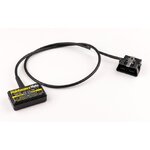
My annual service is due soon and the service icon will need clearing. Already aware of the GS-911 tool which is quite expensive but while looking online at prices a moment ago I came across this product that I’ve not seen before. Picture below.

It’s being sold by a very reputable independent BMW parts supplier Motorworks in Holmfirth. £79.99.

Anyone used this? Is it as easy to use as the write up suggests? Tempted to get one. MTIA.
IMG_1692.jpeg
 
Nope, never heard of it but then again, I have not researched for these kind of tools as my service gets done by the shop. Hopefully someone will comeback with an answer.
 
Yea thanks Anibal. For lots of reasons I’ve gone back down to one bike so my R18 hasn’t done that many miles since last service. I’ve decided this is a keeper and intend to do the routine stuff myself when it’s needed rather than just by time elapsed. This gadget (I believe) doesn’t need anything else to work, like Apps, computers or android phones etc you just plug it in and press a few buttons. I will get in touch with them one of the days and suss out exactly what it does, then decide. I think it’s just a re-set device nothing else but that sounds just what I want. My service light will need doing in about 4 weeks or so.
 
Looks to be packaged/branded by Healtech. They do servo eliminators and fuse blocks. They're decent manufacturers. I am running Motoscan on Android which is simple to use.
 
Interesting ... and I like the built in cable extension ... If you decide to go that route let us know please ... I went the 911 route and I really like it, but you are correct ... not exactly cheap ... and I also do all my own wrenching.
 
Ok chaps, yesterday I ordered this Maintenance Mate. My service icon is due to come on this next week or so. I will let you know if it works and how easy it is to do. I rang the place, Motorworks (very helpful btw) I’m told I don’t need a Smartphone, it’s just a plug in job. This is NOT a diagnostic tool, it’s just a service reset, but that’s all I want.
 
Update. Just used the Maintenance Mate. Verdict in one word. Great.

Only read on if you are interested in buying one. If not this waffle will be a waste of your time. It ended up being a 5 min job, or at least it will be next time I do it. I pre-read the instructions carefully twice before attempting the service icon reset. This is a sort of how to, I considered photos but tbh it’s so simple a job I don’t think it needs it.

Turn the ignition on, bike must be in neutral and in run position but do not start it, then using the menu buttons on the LHS handlebar toggle through the menus to set values to METRIC. I live in the UK so my bike is normally on IMPERIAL units mph, gallons etc. Not sure why you have to do this but it says you must. So I did. If you live in Europe or Canada you can skip this and just dive in.

Next. Leaving the bike ignition still on plug the Maintenance Mate into your OBD socket (under RHS side panel). Easy. The unit then comes to life and should register a number, mine read 10. The instructions explain what the numbers mean and in my case the 10 meant 10,000km between service intervals. I expect unless it’s due it’s first service your bike should be the same really. Anyhow you can reduce that service interval but I don’t see why you would so just left it as it was on 10.

Next. Then by pressing buttons simultaneously on the gadget you go to the next variable, the DATE next service is due. It’s described in the instructions as D1, D2 and D3. They correspond to year, month and day. You only really need to change D1 to knock the year forward a year, which I did by pressing the button. That’s it, press save, the unit displays ‘UP’ which means it’s been uploaded, then switch ignition off. Unplug Maintenance Mate.

It says wait at least 5 seconds before turning ignition back on to check all is well. If not repeat and try again. Mine worked first time. The spanner icon was gone, next service date changed. I then changed my settings back from METRIC to IMPERIAL (mph, gallons etc). Done 👍.

Next time it will be an absolute breeze. Like all of these procedures after you’ve done it once it all makes so much more sense. Ultimately all I had to do was change one value D1 from 24 to 25 (i.e 2024 to 2025).

There is no other functionality or diagnostic ability with this gadget. It allows you to change service interval and service date, that’s it. If that’s all you want, from my experience I would highly recommend it to you. 😁
 
Last edited:
Back
Top