I used to do the following... with a now new issue or extra attention needed:
1. Start up one of the two music apps I was going to use for my ride (YT music or Prime); which both, make-up a downloaded playlist.
2. Enable the "Do Not Disturb" function on my phone; I don't want to take calls and or respond to text messages while riding.... and or having my music interrupted...
3. Start up the BMW Connected mobile app
4. Start up the Bike
5. Start music, selecting play within the Media Menu
6. Start Navigation within the Navigation menu
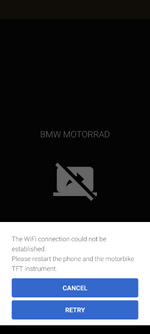
The five above steps always worked well for me; now, after installing the latest version of the BMW Connect App, I found that the "Screen Casting" function for displaying the Navigation maps doesn't load up immediately. I now need to close the mobile app and re-open it until I get the "Retry" option and then it appears to work all day...
NOTE: I tried using the Navigation function on my way to work on the bike this morning (Thursday, June 20); a huge FAILURE, I didn't realize it was so buggy...!! The actual map and navigation function was frozen..
I'll try again on my way home from work...
View attachment 15002




 ) and a new front tyre. No faults found on the bike and no TFT/connectivity issues could be replicated. I guess we'll just have to wait and see what happens.