• Welcome to the BMW R18 Forums. Member registration disables ads and allows you to post and share. Register Here.

How to .... ?

  • <i class="fa--xf fal fa-check "><svg xmlns="http://www.w3.org/2000/svg" role="img" aria-hidden="true" ><use href="/data/local/icons/light.svg?v=1789222567#check"></use></svg></i> Discussion starter Discussion starter CaptJim
  • Start date Start date

CaptJim

Active member
Site Supporter
Joined
Jun 19, 2023
Messages
103
Location
California
Visit site
Bike
R18TC
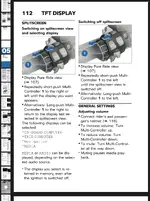
I am aware of 10.25" TFT can be divided into two sections to display different info like GPS (from Connected app) and Radio or Media etc.

But I do not remember how to switch them around or how to arrange to put one of them on the right side to small segment and the other one on the left rather larger side...

Let's say I want the GPS map to show on the right and media info on the left.
But currently if the opposite is showing. I mean if GPS on the left and the media info is on the right then how can I switch them around?
 
You can only cycle through preset screen options for the right side. Then they stay up when you navigate through other screens.
 

Attachments

  • IMG_1341.webp
    IMG_1341.webp
    221.4 KB · Views: 9
I am too lazy to try now but I think the answer to my question is the "long push"... That's the only thing I did not try yesterday. Well, there's something to do for tomorrow afternoon. ;)
 
Set the left screen to the vehicle screen, then take the main screen (again the left side) all the way back to the picture of the engine, tip the wunder wheel aft or forward and the right screen will change scroll through til your nav window appears. Then go back to the main screen and select the radio on your main (Left) side. hope this helps a bit. Lots of doo dads on this beauty ain't there? LOL
 
Back
Top