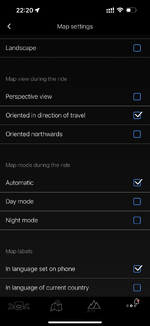
Maps are powered by the BMW app. In the Map Settings you can set under 'Map Labels' if you want to use the language set on the phone or the language of the 'current country'. You may want to experiment with that. But note, I would highly recommend to not use the navigation that BMW chose to provide. For some unfathomable reason they went with their own solution and the roads/labels are impossibly small to to follow and provide no depth of information as to traffic situations / turns and anything you might be looking for. Also, any call, message, email ping, or whatever will cause your map to vanish, usually at some critical moment. BMW's version of the navigation is downright dangerous to use. It is very 'busy' in effort, forces to take your eyes of the road, and is highly unstable causing more distraction. Use the nav on your phone and closer to eye-level so you can keep your situational awareness as you get your directions.
Hence, I would recommend to ignore the map function and use your phone on a mount. (The phone holder in the tank is also a waste of effort.... good for holding rolls of mentos but nothing else. For one, iphones (the ones we actually use, Pro Max - what, is there anybody that buys this kind of bike and does not get the most capable iPhone available??) do not fit. Secondly, every time you stop you need to remove your phone to get an update on what happened in your life the last two hours. BMW, nice ideas, but remove phone charger and just install Apple or Google's carplay platform PLEASE!