• Welcome to the BMW R18 Forums. Member registration disables ads and allows you to post and share. Register Here.

BMW Connected App

  • <i class="fa--xf fal fa-check "><svg xmlns="http://www.w3.org/2000/svg" role="img" aria-hidden="true" ><use href="/data/local/icons/light.svg?v=1789222567#check"></use></svg></i> Discussion starter Discussion starter petenj
  • Start date Start date
I don’t have a connec like that on mine
If you have a the Model B or the TC; you have an USB-C connector within the phone cradle compartment. Follow the cable in the picture I posted,.connected to a Motorola RAZR flip phone. The USB-C is located on the Left Hand Side within the compartment; it's hard to see since it is located within the side of the cradle.
 
I see there's a pretty recent update to the app on November 27, 2023 (Ver. 5.1.1); I'll have to keep an eye out for any new bugs and or issues if I sneak out for a 2024 maiden ride today..

I don't think I've ridden the bike since the new update has been applied...
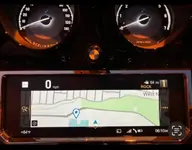
This update seems to have botched the MPH icon that pops at the top left of the TFT when using turn by turn or map. Looks like it shows KPH now. Hope they’ll push a fix soon.

Also, a non app issue, would be nice to have an easy flip to KPH as I’m so close to Canada and hoping to ride over in the spring. No workable solution on the US bikes, as I understand it.
 
This update seems to have botched the MPH icon that pops at the top left of the TFT when using turn by turn or map. Looks like it shows KPH now. Hope they’ll push a fix soon.

Also, a non app issue, would be nice to have an easy flip to KPH as I’m so close to Canada and hoping to ride over in the spring. No workable solution on the US bikes, as I understand it.

I wanted to try and sneak out yesterday for a 2024 ride, where I could have compared my previous experience with the Connect App with the recent version which was pushed this past November (didn't happen due to snow flurries). :-(

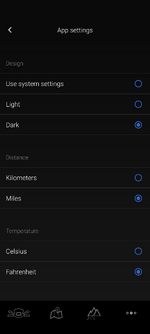
Can you verify that you have MPH selected within the App Settings:


Screenshot_20240102-063845.png
 
Hopefully the BMW Motorrad end users, that are experiencing poor functionality within the ConnectApp are rating it appropriately within the app itself; I think that is the best lever to pull on if we expect to see improvements from BMW.

Some Sr VP owns the Connect App product, and will need to address the issues head-on, in order to show a positive rating for the department's performance.

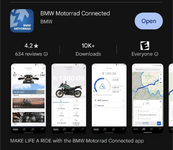
Currently the app has a 4.2 Star rating:

Screenshot_20240102-082835.png
 
I wanted to try and sneak out yesterday for a 2024 ride, where I could have compared my previous experience with the Connect App with the recent version which was pushed this past November (didn't happen due to snow flurries). :-(

Can you verify that you have MPH selected within the App Settings:


View attachment 12739
Yep, set to miles. There’s a recent review in the Apple App Store citing the same issue. Would imagine it’s widespread but the update pushed when a lot of us put the bikes up for the season.
 
Yep, set to miles. There’s a recent review in the Apple App Store citing the same issue. Would imagine it’s widespread but the update pushed when a lot of us put the bikes up for the season.
Agreed.. so our issues are probably being masked or suppressed as most aren't utilizing the app or their bikes; I did however notice that I needed to download all of my map files AGAIN...
 
Similar to reporting the headlight issues - this stuff needs to be made known.

I encourage everyone to review the app in their respective App Store, and send BMW a message with your opinions:

[email protected]

These bikes are too expensive and BMW is too premium a brand for people to just accept mediocrity.
 
Similar to reporting the headlight issues - this stuff needs to be made known.

I encourage everyone to review the app in their respective App Store, and send BMW a message with your opinions:

[email protected]

These bikes are too expensive and BMW is too premium a brand for people to just accept mediocrity.
I rated the app at 2 stars this morning; they need better quality control and regression testing before making their app software generally available.
 
I have found a specific spot where I lose the Map Image and get the basic text Street Name or Road that I'm riding on; this disconnect event happens every single time I ride on Rt-17 in NJ within a specific 100 yard stretch of highway as one example. I'm sure it is RF co-channel interference (same radio frequency) within the Wi-Fi link between my phone and the TFT system. The navigation map function always seems to restore itself automatically

I have experienced the same and I can replicate it on the route. I have quite a bit of experience with RF related stuff and this specific issue is RFI related. For me, it's a local commuter train crossing and I know those things have all kinds of radio equipment working in the big city.

FWIW, my new wireless Android Auto adapter for my car has the same exact problem, so not all of the issues are with the BMW app.
 
The RF problems themselves are not with the BMW connected app.

The issues are with how the app handles them.

First, they use a hokey kludge that requires jumping through some weird hoops to use.

Second, the app usually does not fail or recover gracefully.

Those things need to be improved, as well as many other little things just just as a whole make me not interested in using the app - it’s just not worth it.

I work in IT solving IT issues all day - I don’t want to have to do it on my motorcycle too. I ride to get away from all that. :)
 
Glad to see I am not alone. Very frustrating app. I have to reconnect and restart everything every time I stop just to maintain my music. Have never gotten navigation to work at all. You would think and expect BMW to do better.
 
I run the turn by turn and so long as I have the app open before starting the bike, I’ve not had connection issues like some report.

I don’t like that I’d have to keep the phone “on” to run the map, and don’t really need the map so much, so the turn by turn has been sufficient.
 
I have no problems with this app. All I have to do is make sure my music app is open (YouTube music). Can not say why mine works well compared to the problems others are having. Love this bike and app!

Pixel 8 pro phone.
 
Same here, I really have minimum issues with the connected app. Some parts I love about it, some I hate, Like the fact that you have to go to Media and press play everytime you start your bike... Why not autoplay or give you the option to turn that feature on? Also the fact that you have to say yes to join the wifi network nearly everytime you start the bike when using the same device you have always used... I love the detailed rides statistics from all your rides and the fact that you can get detailed information on your bike without even being at your bike. So I guess there are both good and bad like with most everything, just make it work for you since we are stuck with it.
 
Although I sold my TC and now ride an RT I ditched the app all together and use a Garmin XT2 on both bikes.
Much easier and it works for the times I don't know the area I am in. I don't routinely use a GPS every ride I find it a distraction.
Equally I don't use the radio or any other form of entertainment on any bike.
Just my old school ways I guess, but I don't like apps that track every move you make and report back to some server somewhere.
 
Although I sold my TC and now ride an RT I ditched the app all together and use a Garmin XT2 on both bikes.
Much easier and it works for the times I don't know the area I am in. I don't routinely use a GPS every ride I find it a distraction.
Equally I don't use the radio or any other form of entertainment on any bike.
Just my old school ways I guess, but I don't like apps that track every move you make and report back to some server somewhere.
I hear you and although I do use my music on the go and Sat Nav when needed, I see your point. I don’t look at the Sat Nav constantly but I agree that on complicated junctions and roads, sometimes it can be difficult to keep tract on the Sat Nav whilst keeping an eye on the road. I normally have a look at the Sat Nav display before getting to those complex junctions etc, visualise the maps in my head and apply the guidance whilst negotiating the turns, exit or whatever the road ahead dictates.
In terms of your position being tracked/reported to big brother, if you don’t wish for this to happen you will need to set your privacy settings in your phone so that apps don’t track you, however, your phone company knows where you are at all times because the signal gets triangulated every second the phone is switched on.

 
I hear you and although I do use my music on the go and Sat Nav when needed, I see your point. I don’t look at the Sat Nav constantly but I agree that on complicated junctions and roads, sometimes it can be difficult to keep tract on the Sat Nav whilst keeping an eye on the road. I normally have a look at the Sat Nav display before getting to those complex junctions etc, visualise the maps in my head and apply the guidance whilst negotiating the turns, exit or whatever the road ahead dictates.
In terms of your position being tracked/reported to big brother, if you don’t wish for this to happen you will need to set your privacy settings in your phone so that apps don’t track you, however, your phone company knows where you are at all times because the signal gets triangulated every second the phone is switched on.
Yes there are some things that are tracking you all the time but I try and minimize what they are. The connected app if used as BMW want you to is far more intrusive measuring acceleration, braking even lean angle along with GPS positioning. I prefer not to let anyone have that information. The thing about the Garmin is it works and doesn't drop out or disconnect, it just works when needed.
I find it easier to just turn on the bike start and ride without all the fuss of phone connecting or anything.:)
 
I noticed a couple of things in the new 5.4 ver. of the BMW Connect App on my Google Pixel device when connected to the bike:

For starters, the desktop icon has changed; I started to think my phone somehow deleted the app... It has a different look for sure.

The street name details are missing, I used to be able to zoom in where all of the street names were visible.

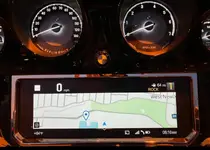
Full Map Display (see below images): When I started the Navigation function, the mirror cast function would occupy the entire screen with the map; however, once you scroll either left or right, and or down to any of the sub menus - the full Map Display is reduced.

You can restore the full Map Display by scrolling down into the sub menu and selecting Start or Stop map display, but ultimately "start map display"; you'll see the entire TFT screen occupied with a map which actually lacks a lot of the street naming details.

Overall though, it seems to be reliable for what I use it for: streaming music and navigation.

Screenshot_20240912-062808.webpScreenshot_20240912-062742.webp
 
Back
Top