• Welcome to the BMW R18 Forums. Member registration disables ads and allows you to post and share. Register Here.

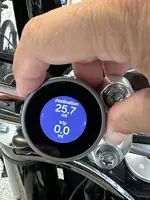
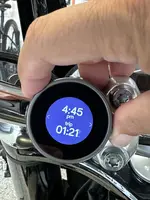
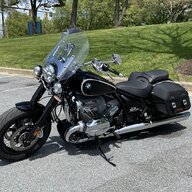
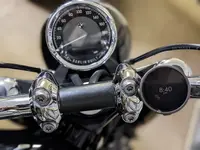
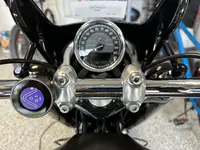
Beeline Moto... classic looking and discreet nav screen

  • <i class="fa--xf fal fa-check "><svg xmlns="http://www.w3.org/2000/svg" role="img" aria-hidden="true" ><use href="/data/local/icons/light.svg?v=1768230793#check"></use></svg></i> Discussion starter Discussion starter emgarciax
  • Start date Start date

emgarciax

Well-known member
Site Supporter
Joined
Jun 14, 2023
Messages
394
Location
Parkland, FL
Visit site
Bike
BMW R 18 Classic
This is basically a remote screen for the Beeline nav app.
More at https://beeline.co/pages/beeline-moto
FYI I come from using Nav VI and then ConnectedRide (cradle and app) on an R 1200 GS so I know the cons of this device.
The accompanying app (which you can download now and try) is pretty decent and also provides clever way to create a route without the need of a web platform. Beeline does have a route planner website at https://maps.beeline.co/
Battery charge lasts about 30 hours, it charges with a USB powered base (small) and clicks on base with a 1/4 twist.
Overall I find this a very clean and clever solution to navigation and not having to wire / clutter the handlebar with a smartphone or GPS device.
Screenshot 2023-07-31 at 5.00.19 PM.webp


IMG_3739.webp
IMG_3738.webp

IMG_3742.webp
IMG_3743.webp
IMG_3744.webp
IMG_3748.webp
 
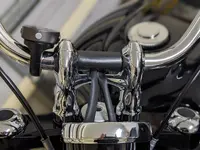
that looks great may I ask if you needed to shim the bar clamp and why didn't you put it in the middle below the BMW clock? just an ocd thing with symmetry that I suffer from.. lol
 
Got the same question as Frenchie : why not in the middle of the handlebar ? I think there is enough (just enough) space between the 2 cables to receive the beeline support.
Thinking replacing my smartphone based app (Liberty Rider) with this beeline in order to simplify things & have less distracting navigation (the smarthphone screen with the map displayed is often too distracting).
 
Looks simple enough. For me personally though, I've found that I don't need the visual afterall. I use bluetooth ear plugs for music anyway, and I find that the audio alone from my phone (stuffed in my pocket) navigation app provides richer instructions than even the NAV display on my R1250GS.

Still though, looks like a neat device.
 
G’day from Queensland folks. I’ve been using the Beeline Moto for a bit more than a year. It’s a straight forward to set up, though take care not to leave battery saver mode switched-on with your mobile device, or the Beeline will lose its way.
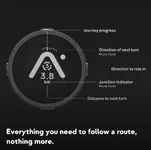
Being an R18 rider, the Beeline Moto appealed to me because of its elegance and simplicity. Sure, it’s not an analogue instrument, but it presents as simple and uncluttered, counting down the distance to the next turn and distilling navigation to turn left or right. Roundabouts are displayed as a number inside the circle to coincide with first / second / third turn.
The idea of a mobile phone device mounted on the handlebar struck me an unsightly solution. Like the bike, the Beeline Moto looks elegant, but you be the judge.
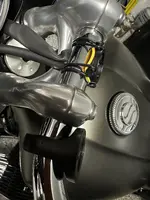
Why is it mounted off centre ? Because the metal mounting clamp is a tad too deep and doesn’t fit between the handlebar and the yoke directly under it. Not annoying at all…..
And the black plastic poly pipe on the bar ? It supresses the sun reflecting off the handlebar to the instrument cluster / speedometer glass. Yes, it’s a bit unsightly, but I’ve not found a better solution… yet.
The key to using this gadget is to plan the ride ahead of time; I use a laptop and the Beeline Moto App together to minimise guess work. It can be done without the laptop, but I’m a bit of dinosaur and find the larger screen easier. It can certainly be done directly on the mobile phone Beeline Moto App.
Beeline_Moto_1.webpBeeline_Moto_2.webp
 
You can install it in the center with the universal mount included with the kit and you can save the cost of the bar clamp. The o-rings avoid the bike wiring whereas the bar clamp does not and hence cannot be fit because of the risers.

IMG_3843.webp

Looking at it a second time now, I might just leave it in the center.

IMG_3846.webp
 
Looks simple enough. For me personally though, I've found that I don't need the visual afterall. I use bluetooth ear plugs for music anyway, and I find that the audio alone from my phone (stuffed in my pocket) navigation app provides richer instructions than even the NAV display on my R1250GS.

Still though, looks like a neat device.
Actually that is a suggestion I am making to the Beeline team. They should enable the app to provide voice prompts.
 
Last edited:
The key to using this gadget is to plan the ride ahead of time; I use a laptop and the Beeline Moto App together to minimise guess work. It can be done without the laptop, but I’m a bit of dinosaur and find the larger screen easier. It can certainly be done directly on the mobile phone Beeline Moto App.
Agreed. However I’ve found the Beeline app to be very easy to use (it also runs on iPad and M1/M2 based Macs)
Also, the maps are very good, pretty much every location or business I’ve entered has showed up (contrary to the BMW ConnectedRide app that I used when I had the GS).
 
Last edited:
Agreed... I thought the plastic mount looked out-of-keeping with the rest of the R18's build quality. I guess I might have shot myself in the foot... being unable to mount it centrally. The off-centre mount doesn't distract... thankfully. The BMW logo would be cool. I tried to buy the Triumph version (logo on the side looked great), but the local Triumph dealer couldn't be bothered returning my call. Their loss....:rolleyes:
 
G’day from Queensland folks. I’ve been using the Beeline Moto for a bit more than a year. It’s a straight forward to set up, though take care not to leave battery saver mode switched-on with your mobile device, or the Beeline will lose its way.
Being an R18 rider, the Beeline Moto appealed to me because of its elegance and simplicity. Sure, it’s not an analogue instrument, but it presents as simple and uncluttered, counting down the distance to the next turn and distilling navigation to turn left or right. Roundabouts are displayed as a number inside the circle to coincide with first / second / third turn.
The idea of a mobile phone device mounted on the handlebar struck me an unsightly solution. Like the bike, the Beeline Moto looks elegant, but you be the judge.
Why is it mounted off centre ? Because the metal mounting clamp is a tad too deep and doesn’t fit between the handlebar and the yoke directly under it. Not annoying at all…..
And the black plastic poly pipe on the bar ? It supresses the sun reflecting off the handlebar to the instrument cluster / speedometer glass. Yes, it’s a bit unsightly, but I’ve not found a better solution… yet.
The key to using this gadget is to plan the ride ahead of time; I use a laptop and the Beeline Moto App together to minimise guess work. It can be done without the laptop, but I’m a bit of dinosaur and find the larger screen easier. It can certainly be done directly on the mobile phone Beeline Moto App.
View attachment 11239View attachment 11240
Leather handle bar wraps..choose your colour...a bit like tennis racket grips... that might look better..
 
Update:
For $4.99 a month you can get voice prompts on your helmet intercom.
You can get a one month free trial.
 
Is anyone using the Beeline Moto in the US? What is your experience? I am thinking about one and I went on their website to try out route planning, and it sent me down a restricted military road that the public is not allowed on. So I have some reservations about its navigation accuracy.
 
Is anyone using the Beeline Moto in the US? What is your experience? I am thinking about one and I went on their website to try out route planning, and it sent me down a restricted military road that the public is not allowed on. So I have some reservations about its navigation accuracy.
I've been using the Beeline Moto for a few years in the US. I mostly use it in compass mode, where I set my destination and then discover roads that match up with the direction. It's up to me to pick the right roads as I just have an arrow pointing at the destination. In fact, I've got a huge number of coffee rides on my site where I've used the Beeline in this way.

But, I think you are describing more of the turn by turn feature. While I do use this when I'm in a rush or if I have a pre-planned route, I've never experienced it sending me down a private road like a restricted military one. I am in the northeast though, so aside from West Point & Camp Smith which are close to me, there aren't a lot of military bases. I use the app directly for planning, and the mapping provider is Google.

The website route planning is in beta now & seems to use Mapbox with OpenStreetMaps. Different mapping providers may have different issues. The good thing with OpenStreetMaps is the open-source community contributes to it, so if it had a private road marked as routable, it could be fixed easily.
 
Is anyone using the Beeline Moto in the US? What is your experience? I am thinking about one and I went on their website to try out route planning, and it sent me down a restricted military road that the public is not allowed on. So I have some reservations about its navigation accuracy.
I have the original version and I am waiting for the new version to arrive.
It works great, looks unobtrusive and is a quality product.
 
I have the original version and I am waiting for the new version to arrive.
It works great, looks unobtrusive and is a quality product.
My metal Moto 2 arrived a couple days ago, so I was installing the new mounts on my bikes. I’ve got a 600 mile trip this weekend where I can start to try it all out.
 
My metal Moto 2 arrived a couple days ago, so I was installing the new mounts on my bikes. I’ve got a 600 mile trip this weekend where I can start to try it all out.
Hi Niel, curious to have your feedback after having Moto 2 for some time. I am coming from a Quadlock setup but concerned that even with a vibration dampener the phone's camera might get damaged due to the vibrating character of this bike (#soulfuel). While I do enjoy the convenience of a screen type map I am sure I could get accustomed to the simple Beeline screen - it sure looks beautiful on this bike. I want to try and respect this beauty by trying the Beeline so looking for feedback from that perspective.

On the flip side, has anyone tried any of these amazon kits with Andoid Auto/ Apple Carplay? If so how has your experience been? Pictures would also help. I feel like they give more useful features than the Beeline but at a cost of compromising the looks.

https://www.amazon.com/Volam-Bluetooth-Waterproof-Hands-Free-Assistant/dp/B0DG8RZMPK/ref=sr_1_4?crid=1GOP2MVT6SL6R&dib=eyJ2IjoiMSJ9.Ak7RUFkwxjYmhIi81eF0HhBP-zn5I3m44Pf33_79j0awdMFucp6BY80eoHJZcfrB7BcHnPYpS_VXowL-bSbkcFUku6mJGbJAIGPGQ9JcMODJXdVcp5sRTMbIOywSZgawy543NmrecEjH1z_CquEI0h-3dgobWNQbjDWOBwZNAPsnxCr5sZEWnye8pnlIgBSdKUMNP-Hm55zNBI0sFqc0jeOJuuqq8fNhnih3OKzTFFA.zzrDSJiOej63JzRZZPk1tF6J5yO8RSj15nv8B_9zUdk&dib_tag=se&keywords=motorcycle+navigation&qid=1734922863&sprefix=motorcycle+navigation,aps,131&sr=8-4

https://www.amazon.com/FancyTiger-Motorcycle-Dashboard-Navigation-Motorbike/dp/B0D7MLXXKS/ref=sr_1_13?crid=1GOP2MVT6SL6R&dib=eyJ2IjoiMSJ9.Ak7RUFkwxjYmhIi81eF0HhBP-zn5I3m44Pf33_79j0awdMFucp6BY80eoHJZcfrB7BcHnPYpS_VXowL-bSbkcFUku6mJGbJAIGPGQ9JcMODJXdVcp5sRTMbIOywSZgawy543NmrecEjH1z_CquEI0h-3dgobWNQbjDWOBwZNAPsnxCr5sZEWnye8pnlIgBSdKUMNP-Hm55zNBI0sFqc0jeOJuuqq8fNhnih3OKzTFFA.zzrDSJiOej63JzRZZPk1tF6J5yO8RSj15nv8B_9zUdk&dib_tag=se&keywords=motorcycle+navigation&qid=1734922863&sprefix=motorcycle+navigation,aps,131&sr=8-13
 
I have one I’ve those screens sitting in my garage. It works great but I sold the bike shortly after I purchased it.
It allows you to keep your iPhone in your pocket and use all the Apple CarPlay functions on the screen.
PM me if you would have interest in it.
 
Hi Niel, curious to have your feedback after having Moto 2 for some time. I am coming from a Quadlock setup but concerned that even with a vibration dampener the phone's camera might get damaged due to the vibrating character of this bike (#soulfuel). While I do enjoy the convenience of a screen type map I am sure I could get accustomed to the simple Beeline screen - it sure looks beautiful on this bike. I want to try and respect this beauty by trying the Beeline so looking for feedback from that perspective.

On the flip side, has anyone tried any of these amazon kits with Andoid Auto/ Apple Carplay? If so how has your experience been? Pictures would also help. I feel like they give more useful features than the Beeline but at a cost of compromising the looks.

https://www.amazon.com/Volam-Bluetooth-Waterproof-Hands-Free-Assistant/dp/B0DG8RZMPK/ref=sr_1_4?crid=1GOP2MVT6SL6R&dib=eyJ2IjoiMSJ9.Ak7RUFkwxjYmhIi81eF0HhBP-zn5I3m44Pf33_79j0awdMFucp6BY80eoHJZcfrB7BcHnPYpS_VXowL-bSbkcFUku6mJGbJAIGPGQ9JcMODJXdVcp5sRTMbIOywSZgawy543NmrecEjH1z_CquEI0h-3dgobWNQbjDWOBwZNAPsnxCr5sZEWnye8pnlIgBSdKUMNP-Hm55zNBI0sFqc0jeOJuuqq8fNhnih3OKzTFFA.zzrDSJiOej63JzRZZPk1tF6J5yO8RSj15nv8B_9zUdk&dib_tag=se&keywords=motorcycle+navigation&qid=1734922863&sprefix=motorcycle+navigation,aps,131&sr=8-4

https://www.amazon.com/FancyTiger-Motorcycle-Dashboard-Navigation-Motorbike/dp/B0D7MLXXKS/ref=sr_1_13?crid=1GOP2MVT6SL6R&dib=eyJ2IjoiMSJ9.Ak7RUFkwxjYmhIi81eF0HhBP-zn5I3m44Pf33_79j0awdMFucp6BY80eoHJZcfrB7BcHnPYpS_VXowL-bSbkcFUku6mJGbJAIGPGQ9JcMODJXdVcp5sRTMbIOywSZgawy543NmrecEjH1z_CquEI0h-3dgobWNQbjDWOBwZNAPsnxCr5sZEWnye8pnlIgBSdKUMNP-Hm55zNBI0sFqc0jeOJuuqq8fNhnih3OKzTFFA.zzrDSJiOej63JzRZZPk1tF6J5yO8RSj15nv8B_9zUdk&dib_tag=se&keywords=motorcycle+navigation&qid=1734922863&sprefix=motorcycle+navigation,aps,131&sr=8-13
I published my review of the Moto 2: https://www.throttleandroast.com/blog/beeline-moto-2-user-review-and-comparison/. It is even better than the original Moto.

I too had a QuadLock on bikes in the past & a Zumo before that. After killing 3 phones, I stopped using QuadLocks. While phones are wonderful in many ways, they aren’t built for the rigors of sitting out in the elements on a motorcycle. Mine stays in a pocket or tank bag now on my bikes.

I think the R18, like most classic bikes doesn’t look good with a giant screen sitting on it. Whether that is a phone, Garmin, or even one of the CarPlay screens.

However, on an ADV bike it’s a different story. I’m planning on swapping my older R1200GSA for the new F900GS and as it has the navigation prep, I’m thinking to use the Chigee AIO-5 BMW Play CarPlay/Android auto device. This works with the whiz wheel on BMWs to control it. I currently use a Garmin Zumo XT on my GSA and it works great.
 
I have one I’ve those screens sitting in my garage. It works great but I sold the bike shortly after I purchased it.
It allows you to keep your iPhone in your pocket and use all the Apple CarPlay functions on the screen.
PM me if you would have interest in it.
I'll PM you for details.

I published my review of the Moto 2: https://www.throttleandroast.com/blog/beeline-moto-2-user-review-and-comparison/. It is even better than the original Moto.

I too had a QuadLock on bikes in the past & a Zumo before that. After killing 3 phones, I stopped using QuadLocks. While phones are wonderful in many ways, they aren’t built for the rigors of sitting out in the elements on a motorcycle. Mine stays in a pocket or tank bag now on my bikes.

I think the R18, like most classic bikes doesn’t look good with a giant screen sitting on it. Whether that is a phone, Garmin, or even one of the CarPlay screens.

However, on an ADV bike it’s a different story. I’m planning on swapping my older R1200GSA for the new F900GS and as it has the navigation prep, I’m thinking to use the Chigee AIO-5 BMW Play CarPlay/Android auto device. This works with the whiz wheel on BMWs to control it. I currently use a Garmin Zumo XT on my GSA and it works great.
I agree with you, and I like that setup. I want to try the Beeline first and after a failed attempt of not getting used to it, I might opt for a larger screen.
 
Back
Top